Settings
The Settings panel provides options to customize your HOLMES experience, including theme selection, data persistence, and application information.
Accessing Settings
Click the hamburger menu icon (three horizontal lines) in the top-right corner to open the settings panel.
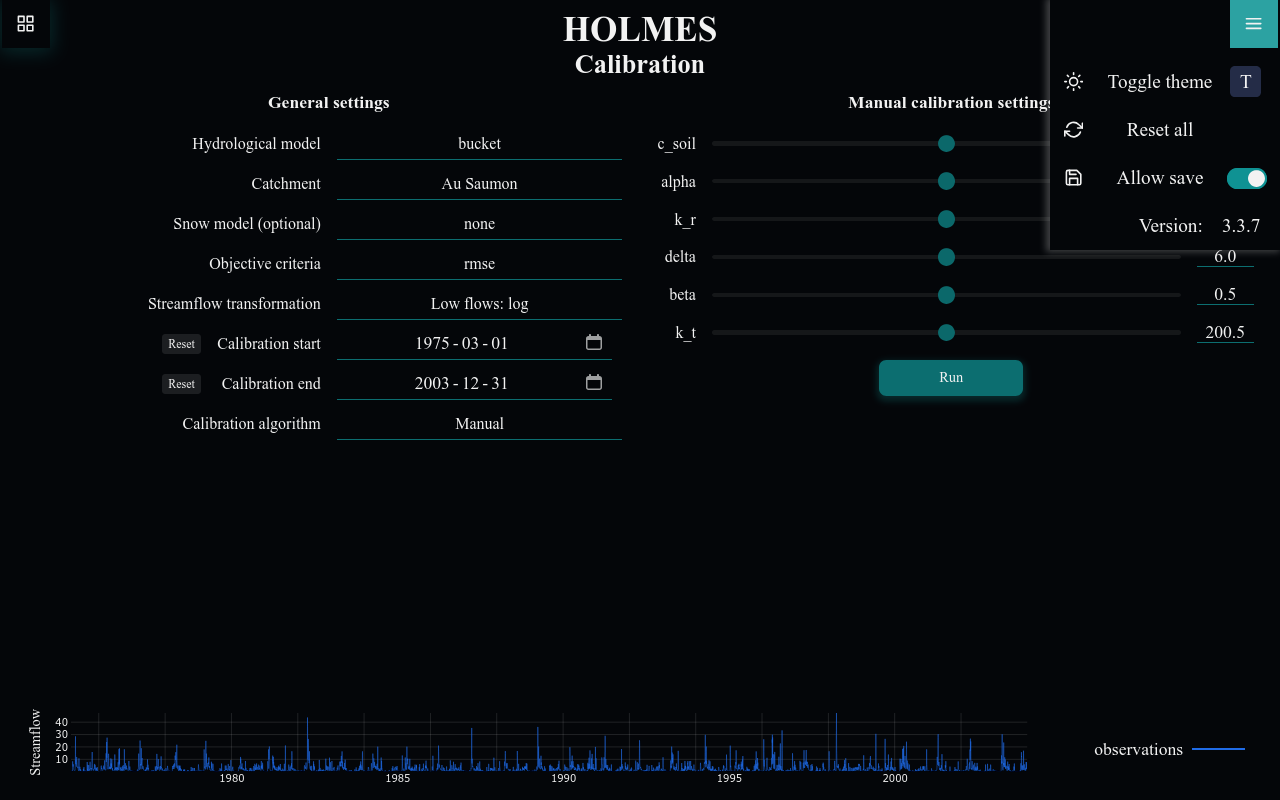
Available Settings
Theme
Toggle between light and dark color themes:
| Theme | Description |
|---|---|
| Dark (default) | Dark background with light text - easier on the eyes in low light |
| Light | Light background with dark text - better in bright environments |
Click the theme button or press T to toggle.
The theme preference is saved automatically if Allow save is enabled.
Reset All
Click Reset all to clear all saved settings and data:
- Clears all localStorage data for HOLMES
- Resets configuration to defaults
- Removes imported calibrations from Simulation and Projection pages
- Reloads the page
Data Loss
Reset all cannot be undone. Any unsaved calibration parameters or imported files will be lost.
Allow Save
Controls whether saved settings are loaded on page load:
| State | Behavior |
|---|---|
| Enabled | Saved settings are loaded from localStorage on page load |
| Disabled | Saved settings are ignored on page load (defaults are used instead) |
When Allow save is disabled, saved settings are ignored on page load (defaults are used instead). However, changes you make during the session are still written to localStorage.
Settings that can be persisted include:
- Selected model, catchment, objective, etc.
- Calibration date ranges
- Imported calibrations (Simulation/Projection pages)
- Theme preference
Version
Displays the current HOLMES version number.
This information is useful when:
- Reporting bugs or issues
- Checking for updates
- Verifying installation
Keyboard Shortcuts
The settings panel includes a visual reminder of available shortcuts:
| Shortcut | Action |
|---|---|
| T | Toggle theme |
Data Storage
HOLMES stores settings in your browser's localStorage under keys prefixed with holmes--:
holmes--settings--theme: Light or dark themeholmes--calibration--*: Calibration page settingsholmes--simulation--*: Simulation page settingsholmes--projection--*: Projection page settings
This data:
- Stays in your browser (not sent to any server)
- Persists until cleared manually or via Reset all
- Is specific to the browser and device you're using
Privacy
HOLMES does not collect or transmit any user data:
- All computations happen locally or on your server
- Settings are stored only in your browser
- No analytics or tracking
Closing the Panel
Click anywhere outside the settings panel to close it.