Simulation
The Simulation page lets you run the hydrological model forward in time using calibrated parameters. This is useful for model validation, comparing multiple calibrations, and testing parameter transferability.
Overview
Simulation applies pre-calibrated parameters to generate streamflow predictions. Unlike calibration, simulation does not modify parameters - it simply runs the model and evaluates performance against observations.
Common use cases:
- Validation: Test calibrated parameters on an independent time period
- Model comparison: Compare performance of different models or calibrations
- Multimodel averaging: Combine predictions from multiple calibrations
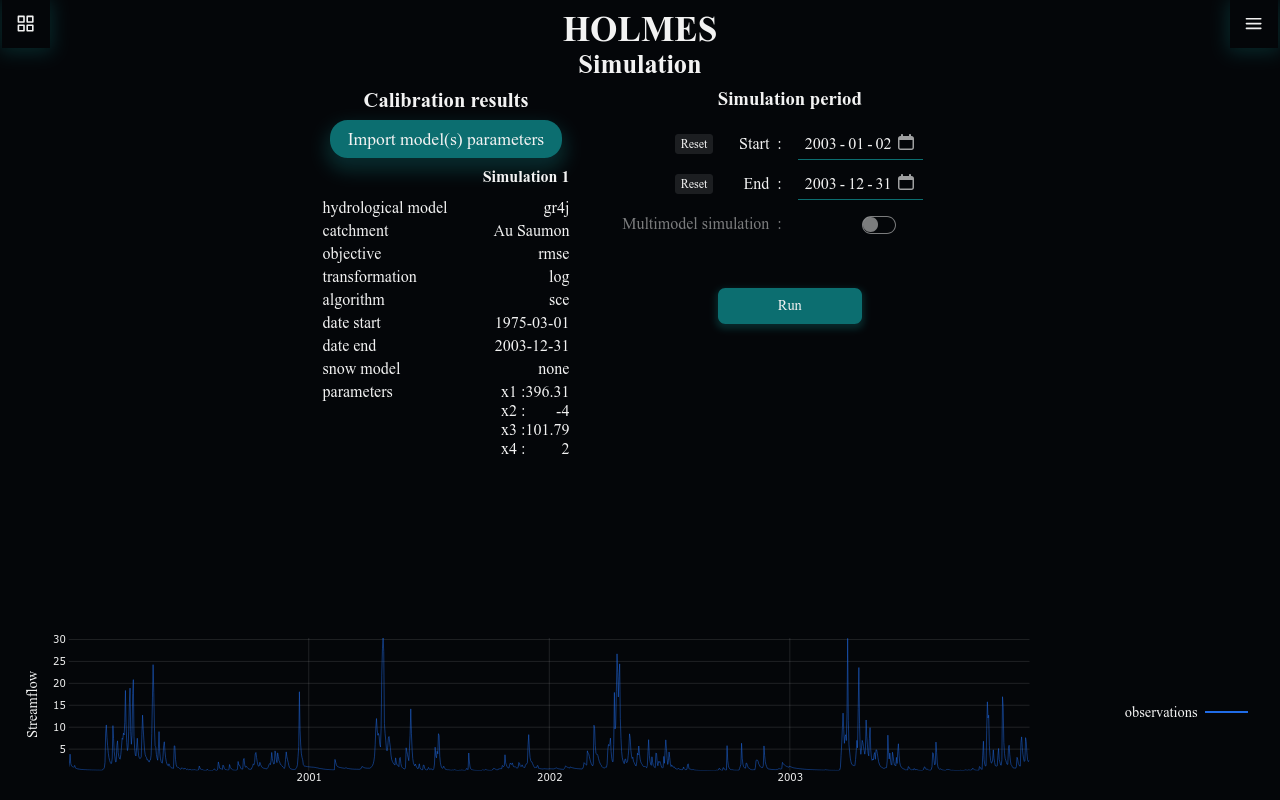
Importing Calibration Results
Before running a simulation, you must import one or more calibration result files.
Step 1: Export from Calibration
First, calibrate a model and export the parameters:
- Go to the Calibration page
- Complete a calibration (manual or automatic)
- Click Export parameters to save the JSON file
Step 2: Import to Simulation
On the Simulation page:
- Click Import model(s) parameters
- Select one or more calibration JSON files
- The imported calibrations appear in the table
Calibration Results Table
The table displays all imported calibrations:
| Column | Description |
|---|---|
| hydrological model | GR4J, Bucket, etc. |
| catchment | The catchment used for calibration |
| objective | Calibration objective (NSE, KGE, RMSE) |
| transformation | Streamflow transformation used |
| algorithm | Manual or SCE |
| date start/end | Calibration period |
| snow model | CemaNeige or none |
| parameters | Calibrated parameter values |
Click the X button next to any calibration to remove it.
Same Catchment Required
All imported calibrations must be for the same catchment. Attempting to import a calibration for a different catchment will show an error.
Simulation Settings
Simulation Period
Set the date range for simulation:
- Start: Beginning of the simulation period
- End: End of the simulation period
- Reset buttons: Return to the catchment's full available range
Validation Period
For proper validation, use a period not included in calibration. For example, if calibration used 1990-2000, validate on 2001-2010.
Multimodel Simulation
When two or more calibrations are imported, enable Multimodel simulation to:
- Run each model independently
- Compute the average of all simulations
- Evaluate the multimodel ensemble performance
This is disabled when only one calibration is loaded.
Running a Simulation
- Import at least one calibration result
- Set the simulation period
- Optionally enable multimodel simulation
- Click Run
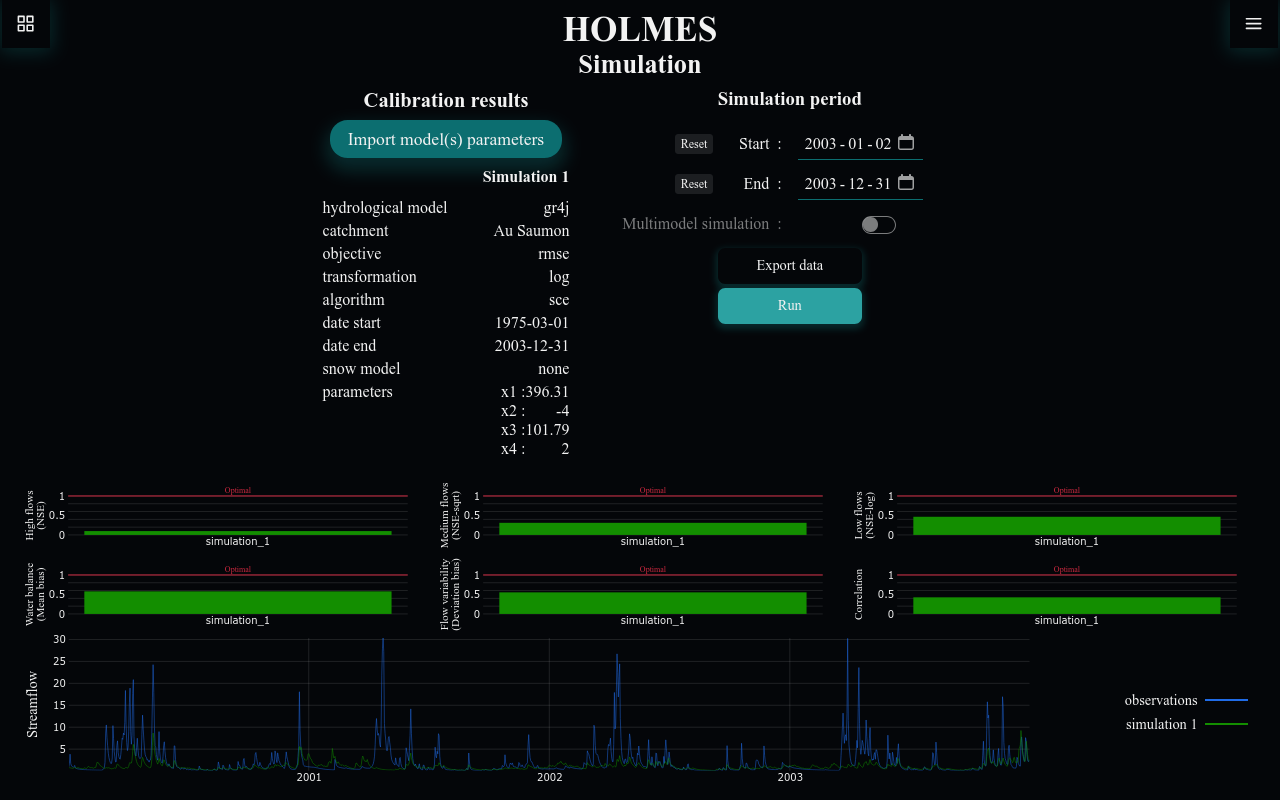
Results appear in the charts on the right.
Understanding Results
Performance Metrics
Six bar charts show different performance aspects for each simulation:
| Metric | Description | Optimal |
|---|---|---|
| High flows (NSE) | NSE with no transformation | 1 |
| Medium flows (NSE-sqrt) | NSE with sqrt transformation | 1 |
| Low flows (NSE-log) | NSE with log transformation | 1 |
| Water balance (Mean bias) | Average difference from observations | 1 |
| Flow variability (Deviation bias) | Standard deviation ratio | 1 |
| Correlation | Linear correlation coefficient | 1 |
Each calibration appears as a separate bar, color-coded to match the streamflow chart.
Streamflow Chart
The time series chart shows:
- Observations (blue): Measured streamflow
- Simulation 1, 2, ... (green, purple, orange, ...): Output from each calibration
- Multimodel (if enabled): Average of all simulations (color depends on number of loaded calibrations)
Chart Interactions
- Zoom: Click and drag to select a time range
- Reset: Double-click to return to full view
Multimodel Performance
When multimodel simulation is enabled, the performance metrics include an additional "multimodel" bar showing the ensemble's performance. Multimodel averaging often outperforms individual calibrations by reducing model structural uncertainty.
Exporting Results
Click Export data to save:
-
Simulation results (JSON): Configuration and performance metrics
{ "calibrationConfig": [ {"name": "simulation_1", ...}, {"name": "simulation_2", ...} ], "config": { "start": "2001-01-01", "end": "2010-12-31", "multimodel": true }, "results": [ {"name": "simulation_1", "nse_none": 0.85, ...}, {"name": "simulation_2", "nse_none": 0.82, ...}, {"name": "multimodel", "nse_none": 0.87, ...} ] } -
Simulation timeseries (CSV): Daily values for all simulations
Common Issues
Cannot Import Calibration
Error: "This isn't a valid calibrated parameter file"
- Ensure the file is a JSON file exported from HOLMES calibration
- Check that the file contains all required fields
Cannot Import Multiple Catchments
Error: "The calibrations need to be on the same catchment"
- All imported calibrations must be for the same catchment
- Export new calibrations from the same catchment
Simulation Already Imported
Error: "This calibration is already imported"
- The same calibration file cannot be imported twice
- Each imported calibration must have unique parameters